Author a workflow
This is authority work. A person or a local agent they watch demonstrates the task once. A named human admits the compiled program. An agent operates it later.
Choose one small real task that doesn't change business data. A read-only lookup against test data works well. Open a known test record, then stop when a field shows the expected value. Don't start with a task that saves, submits, creates, or deletes data.
This walkthrough uses a Playwright-driven browser. The same record, compile, lint, and supervised replay loop works with native Windows, macOS, or Linux applications and RDP or Citrix sessions when you choose a different backend.
Install OpenAdapt
This browser walkthrough runs on each desktop platform in the tabs below. It has no OS-specific steps. Its matching Chromium provisions automatically on the first web action. Native, RDP, and Citrix paths don't install it.
Recommended: install with pip in a virtual environment. The base package
includes the browser driver used by this walkthrough. The engine requires
Python 3.10–3.12; check yours with python --version or
python3 --version.
Use the tab for your shell:
A virtual environment keeps the install isolated and avoids stale-package problems from a shared or Conda base environment.
The browser walkthrough on this page needs no extra system packages. To
later record or replay native Linux applications (--backend linux),
install the AT-SPI runtime and build prerequisites first (Debian/Ubuntu):
sudo apt-get install \
  gcc pkg-config python3-dev libcairo2-dev libgirepository-2.0-dev \
  gir1.2-atspi-2.0 libatspi2.0-0
pip install 'openadapt[capture,linux]'
The built-in driver uses X11; Wayland requires an operator-approved XDG portal session.
For an isolated command-line installation, run
curl -fsSL https://openadapt.ai/install.sh | sh. It installs the same base
package with uv.
Optional installation check
Run openadapt flow tutorial if you want to check the installation before you
touch your own application. It records, compiles, certifies, and verifies a
bundled synthetic workflow. A healthy run ends in VERIFIED. That result
applies only to the bundled task, application, and local system of record. It
doesn't qualify your workflow.
1. Record a read-only task
Before recording, confirm that the application contains test data and that the task needs no write. If the task unexpectedly requires a write, stop and choose a different first workflow.
record --backend web --url opens a headed browser and watches your clicks,
typing, key presses, and scrolling. It writes the recording format that
compile consumes.
(Omitting --backend defaults to web with a printed notice. Production
profiles require it explicitly.)
Perform the task once with a known test record. When the expected result is
visible, press Ctrl+C or close the browser window. OpenAdapt writes the
recording to rec/.
Keep the demonstration clean
Take one direct path and leave out exploratory clicks. The compiler treats the recording as evidence of intent.
2. Compile
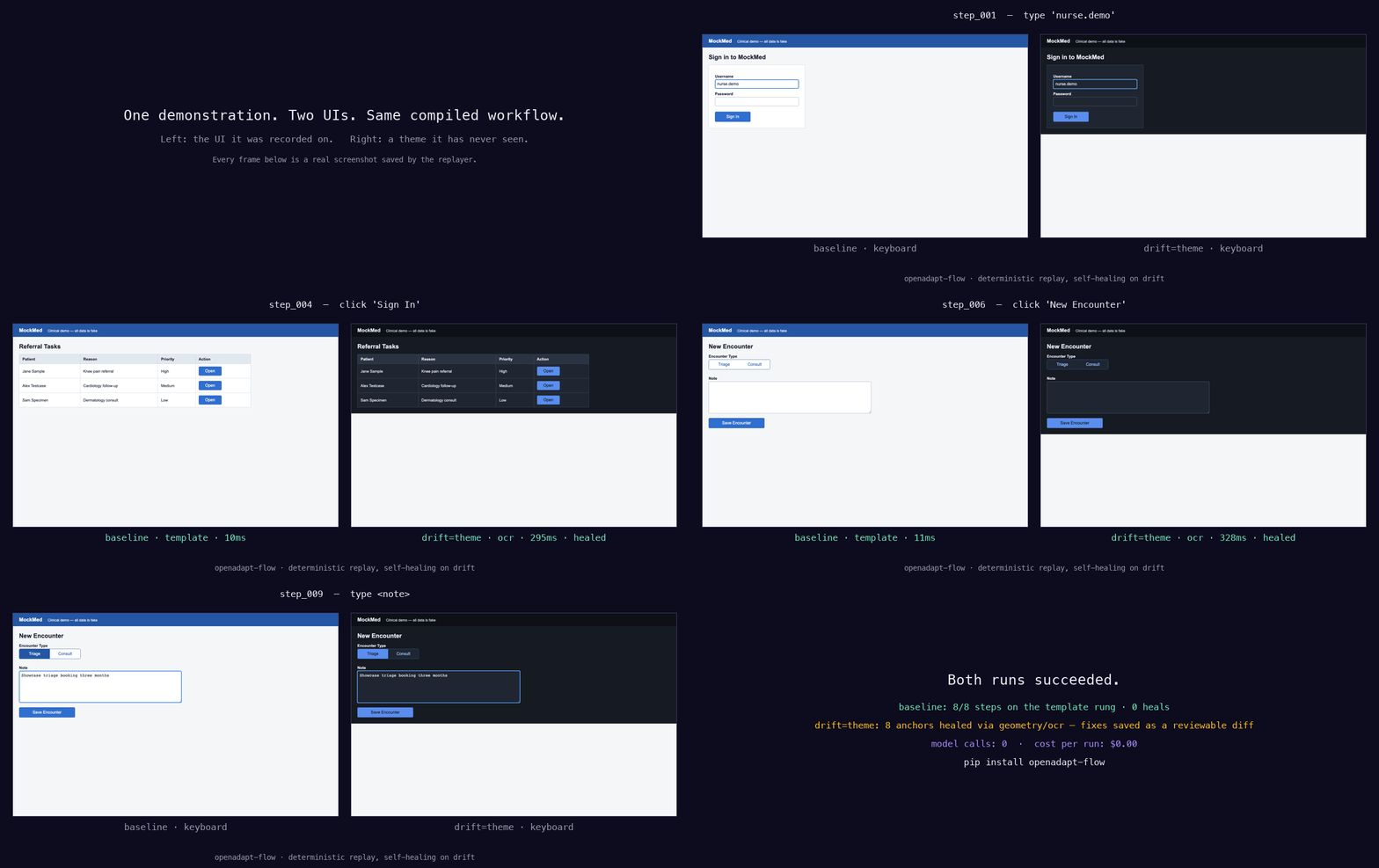
Compilation turns the recording into a workflow bundle. Each step carries evidence that OpenAdapt can use to find the target again, such as a DOM identity, template crop, OCR label, or geometry landmark. See the capability ladder. The compiler also derives screen postconditions from the recorded change.
OpenAdapt classifies write-shaped clicks such as save, submit, create, and delete as irreversible. Treat that classification as a stop signal. Review the bundle before any replay.
Open the compiled program before you lint it:
The page lists every step, the evidence it needs, and where the run can stop. A task that spans two applications is a parent of two child nodes. See Read a compiled program.
3. Lint and review
lint reports missing evidence, missing assertions, write-shaped or
irreversible actions, and risks that may be under-classified. It doesn't decide
whether a write belongs in the recorded task. Review every action yourself.
Stop before replay when a required safety contract is missing
Do not replay if lint or your review finds any of these conditions:
- an action writes data or its risk is unknown;
- an action is consequential or irreversible;
- an action requires an identity, effect, or policy contract and that contract is missing; or
- the recording contains an unexpected application, page, or data source.
Move the bundle to workflow qualification. Set the action risks, add the required contracts, run the qualification cases, and certify the exact version. Then run lint again.
Continue only after strict lint and your manual review are clean. The recorded task must remain read-only and non-consequential.
4. Replay under supervision
Keep the browser in view for the entire run. Use the same test environment and stay ready to stop if OpenAdapt opens the wrong record, leaves the expected path, changes test data, or reaches a screen that wasn't in the demonstration.
Confirm that the expected value appears on screen. Don't use this first replay for a real write. A completed replay is evidence for this supervised run; it doesn't certify the workflow or make it safe for unattended use.
5. Inspect the report
Open runs/first-workflow/REPORT.md. The machine-readable report is beside it
at runs/first-workflow/report.json.
Check that the report shows:
- only the expected test application and data;
- no write or consequential action;
- the visible result you checked during replay; and
- the target evidence, postconditions, halt, or heal for every step.
If the report disagrees with what you saw, stop. Keep the report and recording, then fix or re-record the workflow before another replay. See Read and audit run reports for the evidence fields and Run outcomes and halt reasons for every terminal outcome.
Before you automate a write
Qualify the workflow before a real write or
any unattended run. Bind the exact application and environment, review every
action risk, add identity and independent effect contracts, exercise the
required success and fault cases, and certify the exact workflow version under
its policy. Use the governed run path only after those checks pass.
What is next
- See the compiled program: Read a compiled program
- Build the full qualification project: Qualify a workflow
- Enforce a workload policy: Write and enforce a policy
- Audit the evidence from a run: Read and audit run reports
- Add governed inputs: Parameters and secrets