What you see and control
Each run ends with a result that tells your team what's known about the record and what to do next. These are the five results you'll see.
| What you see | What it means | What your team does |
|---|---|---|
| Done and checked | It saved the entry and read the record back to confirm it. | Nothing. The receipt is the record of the work. |
| Stopped before saving | Something didn't match, so it stopped before changing anything and asked a person. Nothing was written. | Answer the question, or fix the input and run it again. |
| Check the record | A save may have gone through, and OpenAdapt can't confirm it. | Look the record up before anyone runs it again. OpenAdapt won't retry on its own. |
| Didn't finish | A problem with OpenAdapt, the computer, or the connection stopped it before anything was saved. | Fix the problem, then run it again. Tell us if it keeps happening. |
| Finished, not checked | It did the steps but didn't read the saved record back, for example in a practice run. | Use it for practice only. It never counts as done and checked. |
OpenAdapt picks the result from what it can prove about the record. It says nothing was written only when it can show that no save happened. If it can't show that, the run ends "Check the record", even when it stopped early or lost its connection.
In live work, a run that can't read the saved record back never ends "Done and checked". If it may have saved, it ends "Check the record", so a person confirms the save.
The receipt
Each run leaves a record of what it entered and how it checked the result. The full report stays on the computer that ran the workflow.
The shareable receipt is built from a fixed list of fields, such as the outcome, counts, and fingerprints of the evidence. It has no place for screenshots, typed values, or patient names, so it can't carry them.
When a signature matters, for example to an auditor or to a partner's system, a run can carry a signed receipt that can be checked later at a verify link. Signed receipts come with Hosted or an Enterprise deployment, and only when the record check read the record from the system rather than from the screen. A local run on your own computer produces an unsigned report.
When it stops
OpenAdapt stops instead of guessing when:
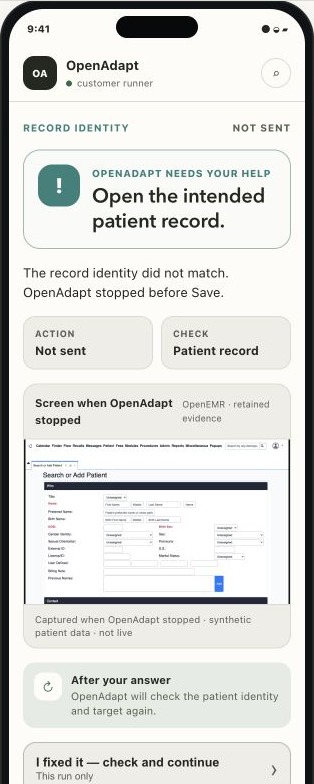
- The record on screen isn't the one it was asked to update, or it can't read the patient or account details clearly.
- The screen changed, and it can't find the same field with confidence.
- The saved record doesn't match what it entered, or the check can't reach the record.
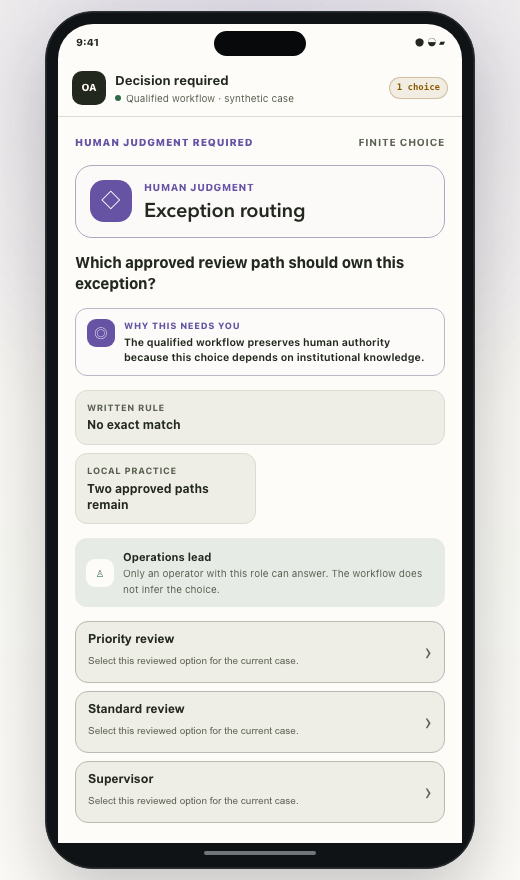
- A step needs a decision that only a person should make.
- The screen shows something the recorded task didn't cover.
It's set to stop when unsure, so some stops turn out to be fine. In our fault test on a test system, each of the 3 checks we compared also stopped 9 of the 18 runs that had saved correctly, because the reply from the server never arrived (method and results). Each of those stops said the save might have gone through, so a person looks the record up before anything is retried.
What you approve
- Before it goes live, your team runs a readiness test with your own cases, including cases that should make it stop. A named person on your team approves the automation before it handles real work.
- When a screen changes, OpenAdapt first tries to find the same field again from what it recorded. If it can't, it stops. A fix can be proposed, and it goes through the same test and a person's approval before the automation uses it.
- A policy that your team reviews says which steps need the right-record check, which saves must be read back, and what the automation may never do.
When a person steps in
When a run stops, the person responsible gets one question on a computer, or on a phone if you set that up. They see the screen as it was when OpenAdapt stopped, and they pick an answer. OpenAdapt then checks the screen and the record again before it continues. A person's answer doesn't count as "done and checked" on its own. The record check still has to pass.
The screen image and the values stay on the computer that ran the workflow. A phone sees them only through a page that this computer serves on your network. If you answer through our hosted dashboard instead, it shows the kind of problem and a few counts, with no screen image and no patient details.
Technical details
The plain result comes from the run's transaction outcome, not from the
execution outcome alone. A run whose execution outcome is HALTED or
FAILED can still have left a write, and then its transaction outcome is
RECONCILIATION_REQUIRED.
| Plain result | Transaction outcome |
|---|---|
| Done and checked | VERIFIED |
| Stopped before saving | HALTED_BEFORE_EFFECT, or REJECTED_POLICY when a gate such as the right-record check refused before anything was written |
| Check the record | RECONCILIATION_REQUIRED, whatever the execution outcome |
| Didn't finish | FAILED_PLATFORM |
| Finished, not checked | COMPLETED_UNVERIFIED (Demo profile only) |
A canceled run (CANCELED) also wrote nothing. A run that found and undid
a duplicate write ends ROLLED_BACK; confirm the record before you run it
again. The hosted Execute API reports these results as lowercase
terminal_outcome values, such as halted_before_effect. The signed
receipt is the Seal.
- Run outcomes and halt reasons
- The Seal
- The identity gate (the right-record check)
- Effect verification (the record check)
- Attend a paused run and teach a correction
- Human judgment in a workflow
- Governed self-healing (approved fixes)
- Write and enforce a policy